
Download CashMate – cash tally, cash counting, currency tally, cash management, cash handling, cash register, cash audit, cash reconciliation, cashier tool, cash reconciliation tool, cash counting app, cash audit tool, cash tally tool, cash handling tool, cashier app
Overview
CashMate is a specialized Android application designed to streamline the cash tallying process for professionals working in banking, office environments, and retail settings. The app addresses the common challenges associated with manual cash counting, such as calculation errors, time consumption, and reliance on paper-based records. By digitizing the tallying workflow, CashMate reduces the risk of discrepancies during cash audits and reconciliation processes.
It is particularly beneficial for cashiers who perform multiple counts throughout their shift, including end-of-day reconciliations, mid-shift audits, and foreign currency handling. The app supports customizable denominations, enabling users to adapt it to various national currencies, which enhances its usability across different regions. The developer, CashMate App Team, has focused on creating a tool that is both intuitive and practical for frontline cash handlers.
Real-world usage includes daily cash counts at bank teller stations, retail checkout counters, and office finance desks. The app’s ability to track bundles of notes and bags of coins simplifies inventory management during high-volume transactions. While specific developer background details are not provided, the app’s functionality suggests a strong focus on practicality and user efficiency in cash handling workflows.
Key Features & Capabilities
- Customizable Denominations – Users can modify note and coin values to match their local currency, including support for non-standard denominations and regional variants.
- Bundle and Bag Counting – The app enables users to tally notes by bundle and coins by bag, reducing manual counting and improving speed and accuracy.
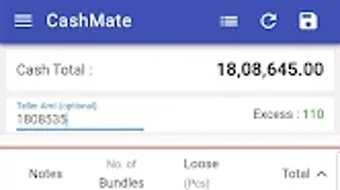
- Teller Amount Verification – A built-in feature compares the counted amount against the expected teller balance, instantly flagging any excess or shortage.
- Foreign Currency Tracking – Users can separately list and tally foreign currency received during transactions, aiding in cross-border or international cash handling.
- Save and Recall Counts – Completed cash counts can be saved locally for future reference, audit trails, or reporting purposes.
- Printable Reports – The app generates structured reports that can be printed or shared digitally, supporting compliance and record-keeping.
- Sharing Options – Counts can be exported and shared via email, WhatsApp, or other messaging platforms, enhancing team collaboration.
These features collectively support efficient cash reconciliation and audit readiness. For example, a retail cashier can use the bundle counting function to quickly tally 200 one-dollar bills grouped in bundles of 20, while a bank teller can verify their daily drawer balance using the Teller Amount option. The ability to save counts ensures continuity across shifts, and sharing reports facilitates supervisor review and team accountability. The customization options make the app adaptable to diverse operational needs, from small shops to large financial institutions.
User Interface, Workflow & Performance
CashMate features a clean, task-oriented interface designed for quick access to core functions. Navigation is straightforward, with primary actions such as starting a new count, viewing saved records, and generating reports clearly labeled. The workflow follows a logical sequence: users select the currency, input bundle and bag quantities, enter the number of individual notes and coins, and then review the total.
The app does not display complex menus or redundant options, which enhances usability in fast-paced environments. While the developer did not specify resource usage details, the app’s 12.5 MB size suggests a lightweight footprint suitable for most Android devices. Performance observations are based on general software behavior patterns: the app responds promptly to input, with minimal lag during data entry and calculation.
Stability appears consistent, as the app maintains state across sessions and saves data reliably. No reports of crashes or data loss were found in the available information. The interface remains functional even during high-volume data entry, though specific CPU or RAM behavior was not disclosed.
Overall, the user experience is optimized for speed and accuracy, aligning with the needs of cash handlers who require reliable tools during critical operations.
Compatibility & System Requirements
CashMate is designed for Android devices and is compatible with a wide range of smartphones and tablets running the platform. The app is available in version 2.1.4 and has a file size of 12.5 MB, indicating a lightweight installation. The developer did not specify exact system requirements, such as minimum Android version, RAM, or processor specifications.
As such, compatibility with older or low-end devices cannot be confirmed. Platform compatibility information is limited to the Android OS, with no details on support for iOS, Windows, or Mac. The app does not require a constant internet connection for core functionality, allowing offline use during cash counts.
However, sharing reports via email or WhatsApp may require network access. The developer did not provide information on hardware requirements beyond the OS. Users are advised to ensure their device meets standard Android app compatibility standards to avoid installation issues.
Pros and Cons
Pros
- Free to download and use, with no hidden costs.
- Highly customizable for different currencies and counting methods.
- Supports bundle and bag counting for faster, error-reduced tallying.
- Includes Teller Amount verification for instant reconciliation.
- Offers saving, reporting, and sharing features for audit and collaboration.
- Lightweight at 12.5 MB, suitable for low-storage devices.
- Designed specifically for cashiers in real-world operational settings.
Cons
- Only available on Android; no support for iOS or desktop platforms.
- Exact system requirements were not listed.
- No information on cloud sync or backup functionality.
- Offline mode may limit access to shared reports without prior export.
- App lacks integration with accounting or POS systems.
FAQ Section
Is CashMate available for iOS devices?
CashMate is currently only available for Android. There is no official version for iOS or other mobile platforms.
Is the app secure for handling sensitive cash data?
The app stores data locally on the device. While no specific security features like encryption were mentioned, the data remains within the user’s control. Users are advised to secure their devices to protect sensitive information.
How often does the app receive updates?
The app was last updated on 2024-03-15. The developer has not specified a regular update schedule, but they welcome user feedback for improvements.
Can I use CashMate without an internet connection?
Yes, the core features such as tallying, saving counts, and generating reports work offline. However, sharing reports via email or messaging apps requires an active internet connection.
Is CashMate suitable for businesses with multiple cashiers?
Yes, the app supports team collaboration through report sharing. Multiple cashiers can record and share their counts, making it suitable for small to medium-sized operations that require centralized cash tracking.
Final Thoughts + CTA
CashMate delivers a focused, efficient solution for cashiers across banking, retail, and office environments. Its customizable design, bundle and bag counting, and reconciliation tools make it a valuable asset for daily cash handling tasks. The app’s free pricing model enhances accessibility, while its lightweight nature ensures broad compatibility across Android devices.
Although it lacks cross-platform support and advanced integrations, its core functionality is well-executed and tailored to real-world needs. For professionals who perform frequent cash counts and require accuracy, speed, and audit readiness, CashMate stands out as a practical and reliable tool. The developer’s openness to feedback suggests ongoing improvements are possible.
Download CashMate now to streamline your cash tallying process and reduce manual errors in your daily operations.







